


Until now, there was no flight planning tool that could handle a full aeromagnetic campaign in one place. Survey line layout, tie lines, historical line matching, sub-area splitting, take-off coordination, and flight time estimation all lived in separate tools or manual processes.
Teams planned lines in Oasis Montaj, exported KML, uploaded to DJI Pilot 2 or QGroundControl, and managed everything else in spreadsheets. If a new campaign had to match an older one, the alignment was done by hand.
UgCS 6.0 puts all of it into one project.
Key Takeaways
- UgCS 6.0 introduces Large Projects: a single project structure that holds the full survey area, sub-area splitting, tie lines, historical line alignment, take-off points, and per-sub-area flight time estimates.
- Large Area Splitting lets you draw or import one polygon and divide it into flyable sub-areas while the survey grid stays consistent across the whole project.
- Shift Right adjusts the entire flight line grid as a single parameter, so new campaigns can be aligned to historical lines from KML at planning time rather than corrected in post-processing.
- Overshoot and overlap are now project-level parameters tunable per sensor type, including Geometrics MagArrow, SENSYS MagDrone R3/R4, and SPH Engineering MagNIMBUS.
- Available in UgCS Expert ($185/month or $1,855 perpetual) and UgCS Enterprise ($275/month or $2,735 perpetual). Not available in UgCS Pro. Free testing in UgCS Open.
Large area splitting
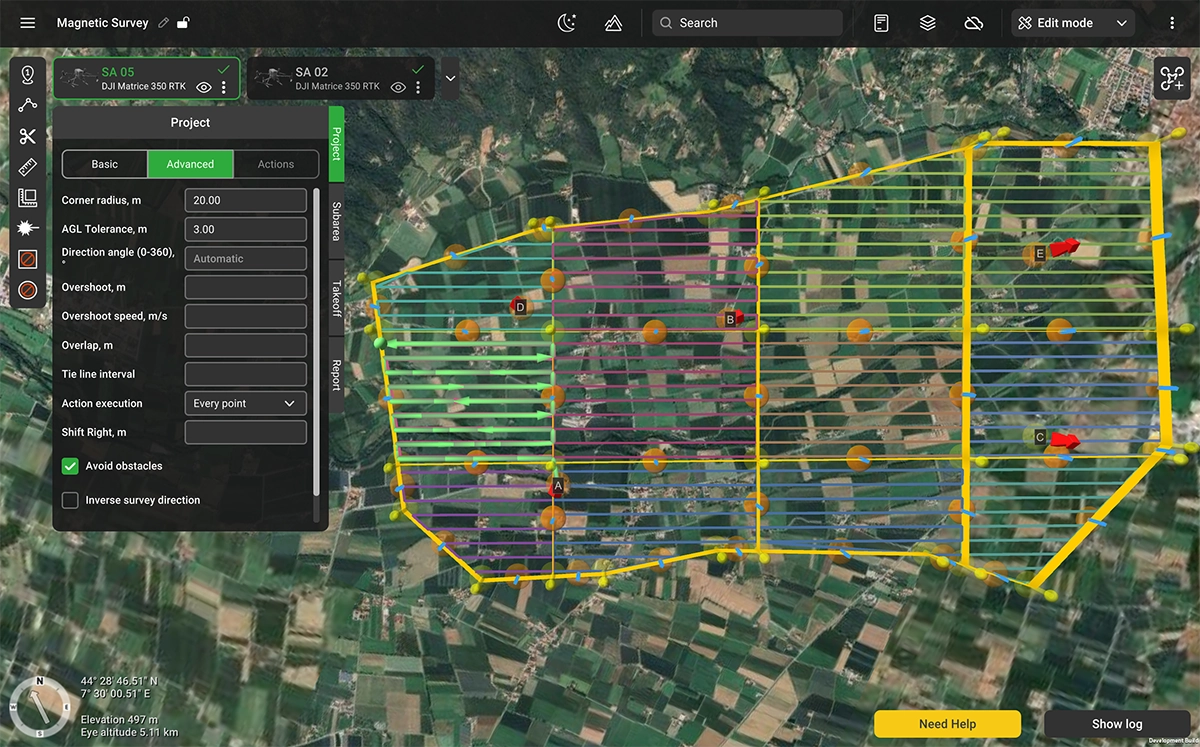
A Large Project starts with a single polygon that defines the survey boundary, drawn on the map or imported from a KML file. UgCS 6.0 allows to split it into flyable sub-areas. The survey line grid stays consistent across all sub-areas.
Sub-areas can be divided further with the Cut tool or merged together. Any sub-area can be converted to a standard Route at any time, giving you full waypoint-level control when a specific area needs fine-tuning. The project stays intact, and every sub-area inside it shares the same survey grid.
Tie lines
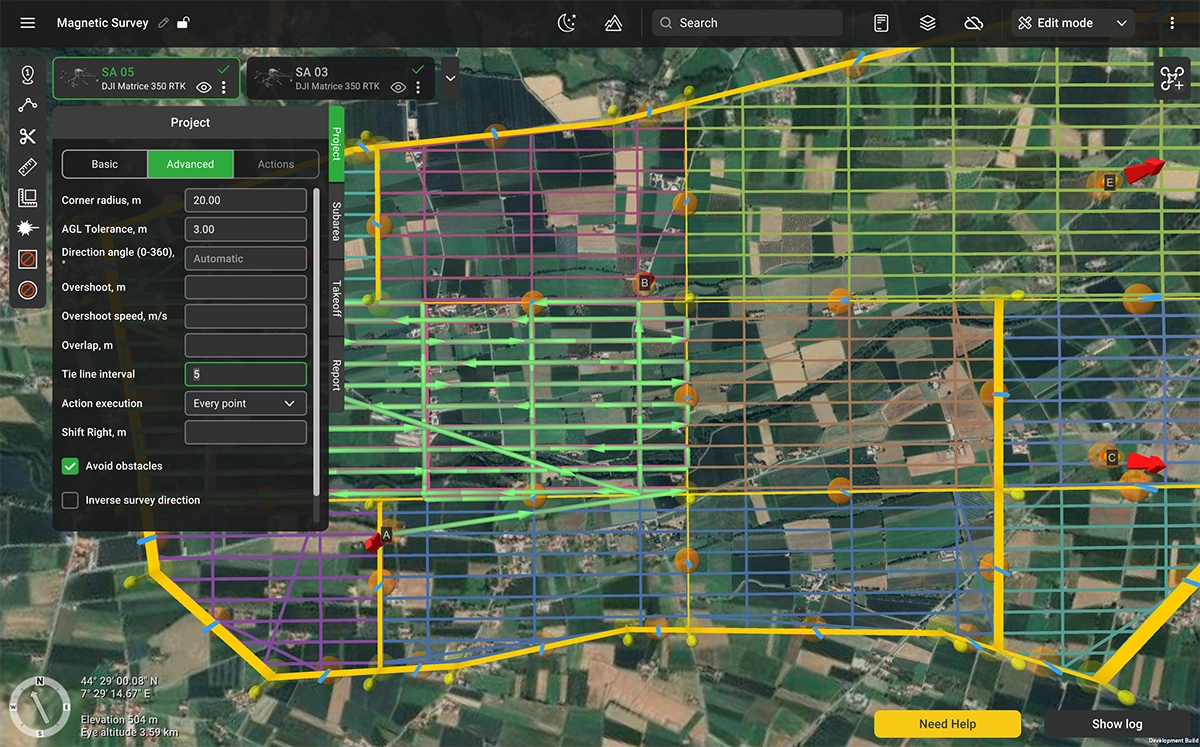
Tie lines are a standard requirement for aeromagnetic data validation. In UgCS 6.0, they are a project-level parameter. You set the frequency (for example, one tie line for every five or ten survey lines), and UgCS places them perpendicular to the main survey lines across the entire project, consistent across all sub-areas. There is no need to build them by hand or align them between flights. The same parameter applies to ground-penetrating radar (GPR) and bathymetric survey configurations where cross-line validation is part of the workflow.
Shift right
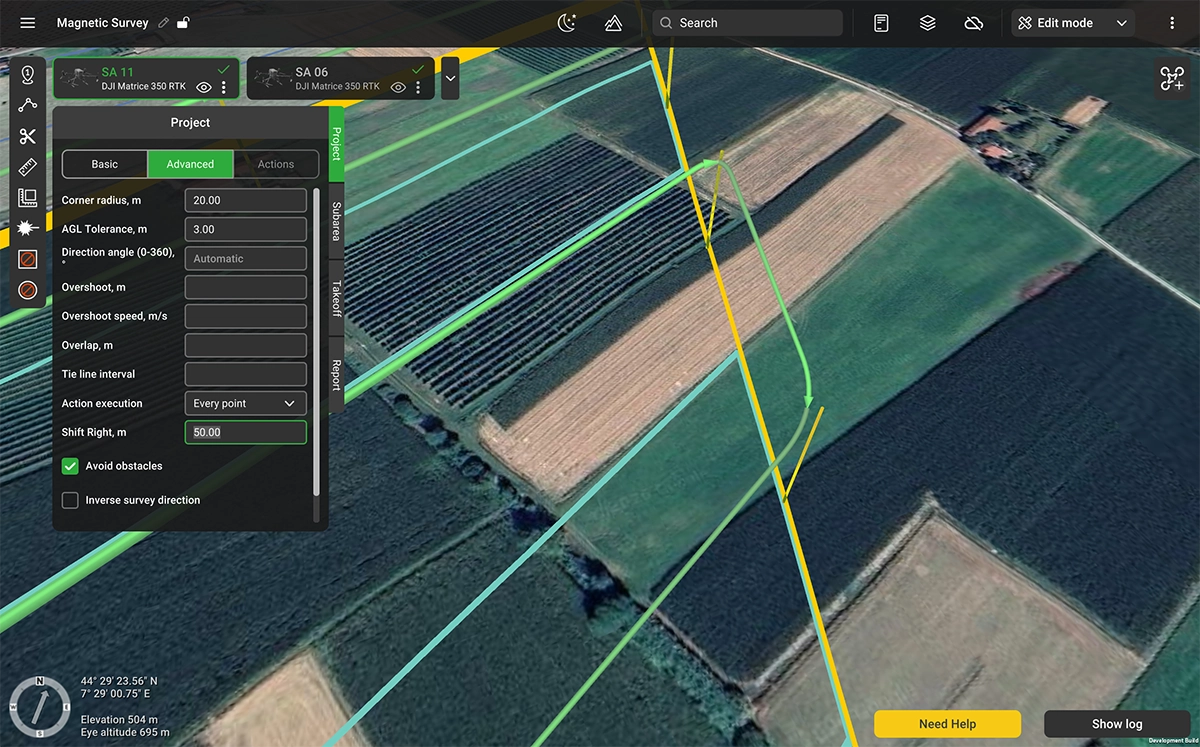
Many aeromagnetic campaigns are repeat surveys over previously flown areas. Comparing new data against historical results requires today's flight lines to fall close to where they were in the previous campaign. Even a small offset between campaigns introduces noise into the comparison that has to be corrected in post-processing, if it can be corrected at all.
Shift Right is a parameter on Large Projects that adjusts the position of the entire flight line grid. Previous survey lines can be imported as KML, and the offset adjusted until the new lines match the historical ones. The adjustment applies uniformly across all sub-areas in the project.
Take-off points
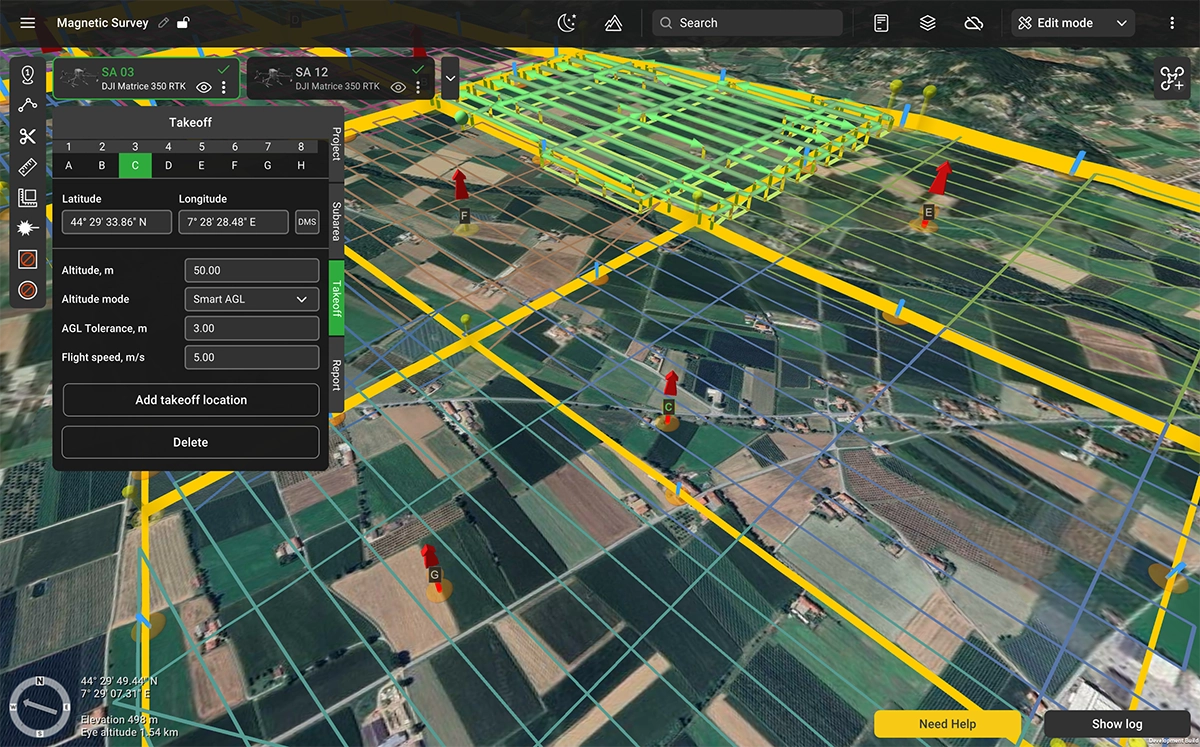
Large Projects support multiple take-off locations. Each take-off point is placed on the map and assigned to one or more sub-areas, so the field crew can plan vehicle positioning and equipment staging before arriving on site.
Flight time per sub-area
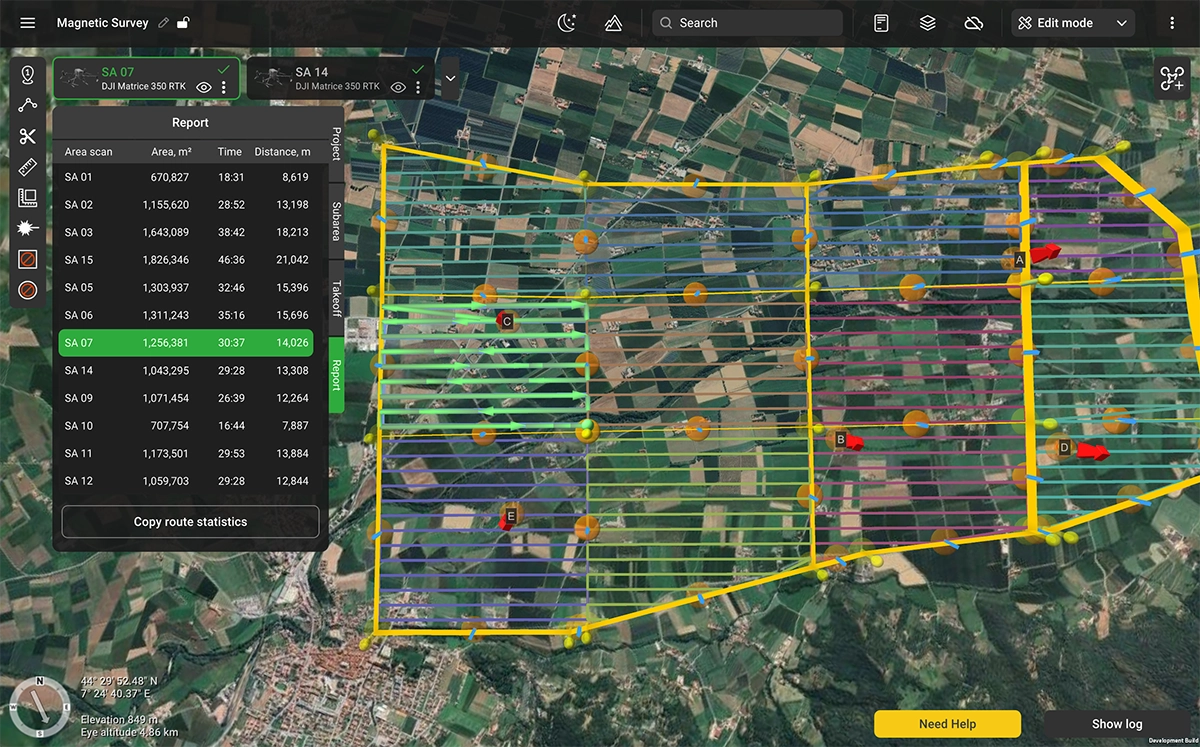
The Report section provides a per-sub-area summary: area size, total survey line distance, and estimated flight time. If a sub-area exceeds the expected battery endurance for the platform in use, it shows up on screen before the team mobilizes. The tools allow adjustments until every sub-area fits the available flight time.
Overshoot and overlap
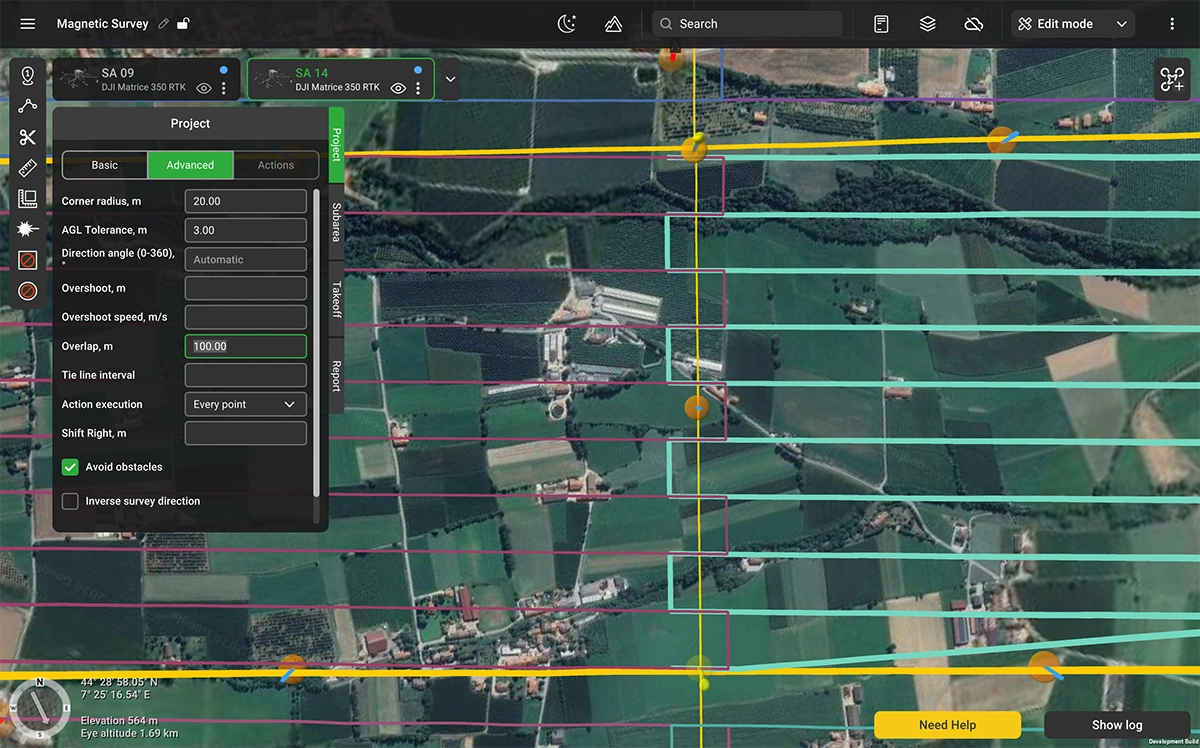
Magnetic data quality degrades during turns at the end of survey lines. Sensor pendulum effects, deceleration, and heading instability all contribute noise. Overshoot extends each survey line beyond the sub-area boundary at a reduced speed, keeping the noisy portion outside the survey footprint.
Overshoot and overlap are project-level parameters in UgCS 6.0. The values are tunable per sensor type. Suspended sensors such as the Geometrics MagArrow require longer overshoot segments at lower speed. Rigidly mounted sensors such as the SENSYS MagDrone R3 and R4 require shorter segments. You set the values once at the project level, and they apply to every sub-area.
Industries and applications
Mineral exploration and mining
Aeromagnetic surveys for mineral exploration are repeat business. The same claim block gets surveyed, then resurveyed when models get refined or ground conditions change. Shift Right turns the comparison alignment from a post-processing problem into a planning parameter. Large Area Splitting lets a single project cover a full exploration license without the planning workflow breaking apart at scale.
Oil and gas
Pipeline tracing, well location verification, and reconnaissance over remote leaseholds share a common requirement: large areas, repeat campaigns, and data that has to hold up against historical baselines. Tie lines validate the readings across the survey. Shift Right aligns the grid to past campaigns. Large Area Splitting handles areas that would otherwise require manual splitting across multiple planning tools.
Geological surveys and government mapping
National geological surveys run aeromagnetic programs over years and decades. The long-term value of the dataset depends on line consistency across that timescale. UgCS 6.0 provides a project structure that can be reopened, adjusted, and reflown years later with the original survey grid intact.
UXO clearance
Drone magnetometry for unexploded ordnance (UXO) is high-volume work over large, difficult terrain. The planning load is significant with dense grids, dozens of flights per site, sometimes weeks of continuous operations. Per-sub-area flight time previews and take-off point assignment are built for exactly this kind of deployment.
Supported drone platforms
UgCS 6.0 supports the same drone platforms as previous versions. For magnetic survey work, the most commonly used platforms include the DJI Matrice 400, DJI M350 RTK, DJI M300 RTK, Inspired Flight IF800 and IF1200A, and ArduPilot/PX4-based systems. Large Projects work with any platform that UgCS supports for area scan operations available in UgCS Expert or Enterprise. Test for free in UgCS Open.
Scope and limitations
Large Projects in this release are designed for magnetic survey planning. Support for LiDAR survey planning within the Large Project framework is planned for a future release.
Tie lines, Shift Right, and overshoot parameters are configured for the magnetometer systems UgCS currently profiles, including SPH Engineering MagNIMBUS, Geometrics MagArrow, SENSYS MagDrone R1/R3/R4, GEM Systems GSMP-35U/25U, and GEODEVICE AeroSmartMag/AeroQuantumMag. Teams using other sensor systems should contact SPH Engineering support to confirm compatibility before deployment.
UgCS is flight planning software. Magnetic data processing, including leveling, gridding, and anomaly identification, is performed in dedicated tools such as SENSYS MAGNETO or Seequent Oasis Montaj.
UgCS 6.0 availability and pricing
UgCS 6.0 is available in UgCS Expert (from $185/month or $1,855 perpetual) and UgCS Enterprise (from $275/month or $2,735 perpetual). Large Projects are not included in UgCS Pro.
Customers with active perpetual licenses receive the update automatically. Subscription users receive the update on their next application launch.
Check Pricing for UgCS Expert & Enterprise
What's next
A detailed guide to planning drone magnetic surveys with UgCS, covering terrain model management, line spacing, sensor-specific overshoot settings, and tie line configuration, will be published next week.