
Drone-Based 3D Mapping and Volume Measurement for Survey-Grade Results
SPH Engineering provides the flight planning, sensor integration, and data management tools that surveyors and engineers need to capture centimeter-accurate 3D models and volume calculations from drones.
Our customers use UgCS, SkyHub, and DroneGIS to map stockpiles, construction sites, quarries, and complex terrain, then turn that drone survey data into reliable deliverables that their clients and management teams can act on.
Used by BHP, one of the world's largest mining companies, for daily stockpile surveys
0.4 cm/pixel GSD achieved in peer-reviewed university research (University of Patras)
Works with DJI, Inspired Flight, Autel, Ardu / PX4, and 20+ drone platforms
Full offline operation for remote sites with no cell service


What Makes High-Precision Drone Mapping So Difficult?
Getting a drone in the air is the easy part. Getting survey-grade mapping and volumetric data out of it is where most teams run into problems.

Inconsistent GSD on uneven terrain
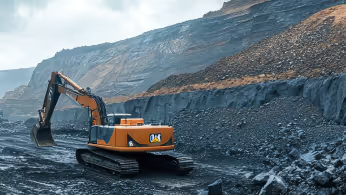
Standard drone mapping apps fly at a fixed altitude above the takeoff point. On a quarry face with 80m of elevation change, your GSD varies wildly between the top and bottom of the site. Images captured too high produce blurry, unusable data. Images too low risk a collision. The result: gaps in your model or a full re-flight.

Large-area missions that exceed single-battery coverage
A 500-hectare mining site or a 200 km corridor scan does not fit in one flight. Splitting the mission across multiple batteries introduces overlap gaps, misaligned datasets, and hours of manual flight planning on a tablet screen.

Vertical and oblique surfaces that grid missions miss
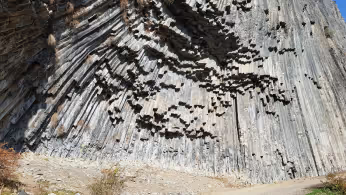
Stockpile sides, pit walls, cliff faces, and building facades are invisible to nadir (straight-down) flight patterns. Traditional grid missions only see the top of a stockpile. Stockpile volume calculations based on incomplete geometry undercount material.

Offline operations at remote sites
Cloud-based drone mapping apps stop working when there is no cell service. Many mine sites, rural construction projects, and field survey locations have zero connectivity. If your software needs the internet to load maps or upload flight plans, you cannot fly.

From raw data to trusted survey deliverables
Flying the drone is only half the job. Survey teams need to organize, store, share, and compare datasets across multiple flights, sites, and time periods. Without a system for that, data lives on SD cards and individual laptops.
How Drones Improve 3D Mapping and Volume Measurement
Drone-based surveys replace weeks of ground work with hours of flight time, and the data is more complete.
Choose the flight pattern for the target
Use area mapping, corridor missions, Vertical Scan, Circlegrammetry, or LiDAR planning according to the surface or object being mapped.

Keep the route aligned with terrain
Use terrain-aware planning where elevation changes would otherwise alter the planned sensor-to-surface distance.

Capture vertical and oblique geometry
Use target-facing or convergent imagery when important surfaces cannot be adequately captured with an overhead grid.

Plan LiDAR missions around the sensor workflow
Use LiDAR-specific mission planning and supported calibration functions rather than treating LiDAR acquisition like standard camera mapping
Reduce capture load where Circlegrammetry fits
In Dalhousie University’s controlled field test, the fastest tested Circlegrammetry configuration used 158 images versus 731 for standard oblique capture, while reported GCP RMSE remained comparable
How It Works

Define the mapping target
Start with what needs to be mapped or measured and the required output. Terrain, stockpiles, vertical structures, and linear assets require different acquisition geometry.

Select the capture methode
Choose the UgCS mission type that fits the target: photogrammetry for area mapping, Circlegrammetry for convergent oblique capture, Vertical Scan for vertical surfaces, Corridor for linear assets, or LiDAR planning when using a LiDAR sensor.

Configure the mission
Set the parameters required by the selected method, such as flight height or standoff distance, GSD, overlap, camera angle, speed, and terrain settings. Review the calculated route before flight.

Capture data for processing
Fly the planned mission and send the captured imagery or LiDAR data to the appropriate processing software to create the required mapping or 3D output.

Our Solution Stack for Drone Mapping and Volumetrics
LiDAR & Photogrammetry
SOFTWARE

UgCS flight planning software with: Terrain-Following, Corridor Scanning, Photogrammetry, LiDAR and Calibration Tools.

Online GIS for Surveyors and Geophysicists.
TRAINING

Advanced technical training and expert support to elevate your team’s expertise and ensure precise, efficient execution of your drone-mission tasks.



FAQs
How accurate is drone 3D mapping?
There is no single accuracy figure for drone 3D mapping. Accuracy depends on the sensor, flight parameters, GSD or point density, positioning and ground control, target geometry, and processing workflow. UgCS plans the acquisition mission; final mapping accuracy must be evaluated in the processed dataset.
See construction-specific survey planning and accuracy considerations.
How accurate are drone stockpile volume measurements?
Volume accuracy depends on the quality of the reconstructed surface, positioning and control, stockpile geometry, point density or GSD, processing workflow, and definition of the stockpile boundary and base surface. A universal percentage should not be applied across projects.
Read our dedicated page for recurring stockpile surveys and construction volumetrics.
Can UgCS plan and fly mapping missions without internet access?
Yes. UgCS is installed locally and supports offline mission planning and field operation. Maps and elevation data needed for the survey can be prepared before travelling to a site without connectivity.
This is particularly useful for mines, remote infrastructure, and field research sites. The published BHP case study, for example, describes drone operations at mine sites without 4G or 5G coverage.
What drones and sensors work with UgCS for 3D mapping?
UgCS supports DJI, Freefly, Autel, ArduPilot, PX4, and other supported platforms, with current UgCS product information stating support for 100+ drone platforms.
The appropriate sensor depends on the mapping method. UgCS supports camera-based photogrammetry workflows as well as LiDAR mission planning. Compatibility is model- and workflow-specific, so the exact aircraft, controller, and payload combination should be checked against the current UgCS compatibility documentation before deployment.
Which UgCS license do I need for 3D mapping?
The required license depends on the mission-planning tools and workflow you need. UgCS currently provides different license tiers with different capabilities, including options for professional mapping, LiDAR workflows, and enterprise deployments.
Because license packaging and included features can change, check the current UgCS pricing and feature comparison before selecting a license.
Does UgCS process photogrammetry or LiDAR data?
No. UgCS is used for drone mission planning and flight control. It does not process captured imagery into an orthomosaic or 3D model, or turn raw LiDAR measurements into a finished point cloud.
After the flight, process the captured data in the appropriate photogrammetry or LiDAR software. Processed spatial data can then be uploaded to DroneGIS for browser-based visualization, organization, and sharing.