

Key Takeaways
- LiDAR measures ground elevation under vegetation, in low light and over textureless surfaces, so it is the stronger choice for forestry, powerline inspection and overgrown sites. Photogrammetry costs less on open, well-lit areas.
- Plan backward from the deliverable. The point density and accuracy the client needs set the altitude (usually 50 to 100 m, or 165 to 330 ft, AGL), the speed (usually 5 to 8 m/s) and the line spacing.
- Terrain following keeps point density even over hills, and IMU calibration keeps the point cloud from warping.
- With RTK or PPK correction, DJI rates the Zenmuse L2 at 4 cm vertical accuracy at 150 m and the Zenmuse L3 at 3 cm at 120 m. Survey-grade scanners from RIEGL are rated at 10 to 15 mm. Ground control points prove what you delivered.
- US price guides published in 2026 put LiDAR surveys at about $50 to $150 per acre and $1,500 to $3,000 per field day. A DJI Matrice 400 with a Zenmuse L3 and UgCS EXPERT lists at about $33,000.
What Is LiDAR Drone Mapping?
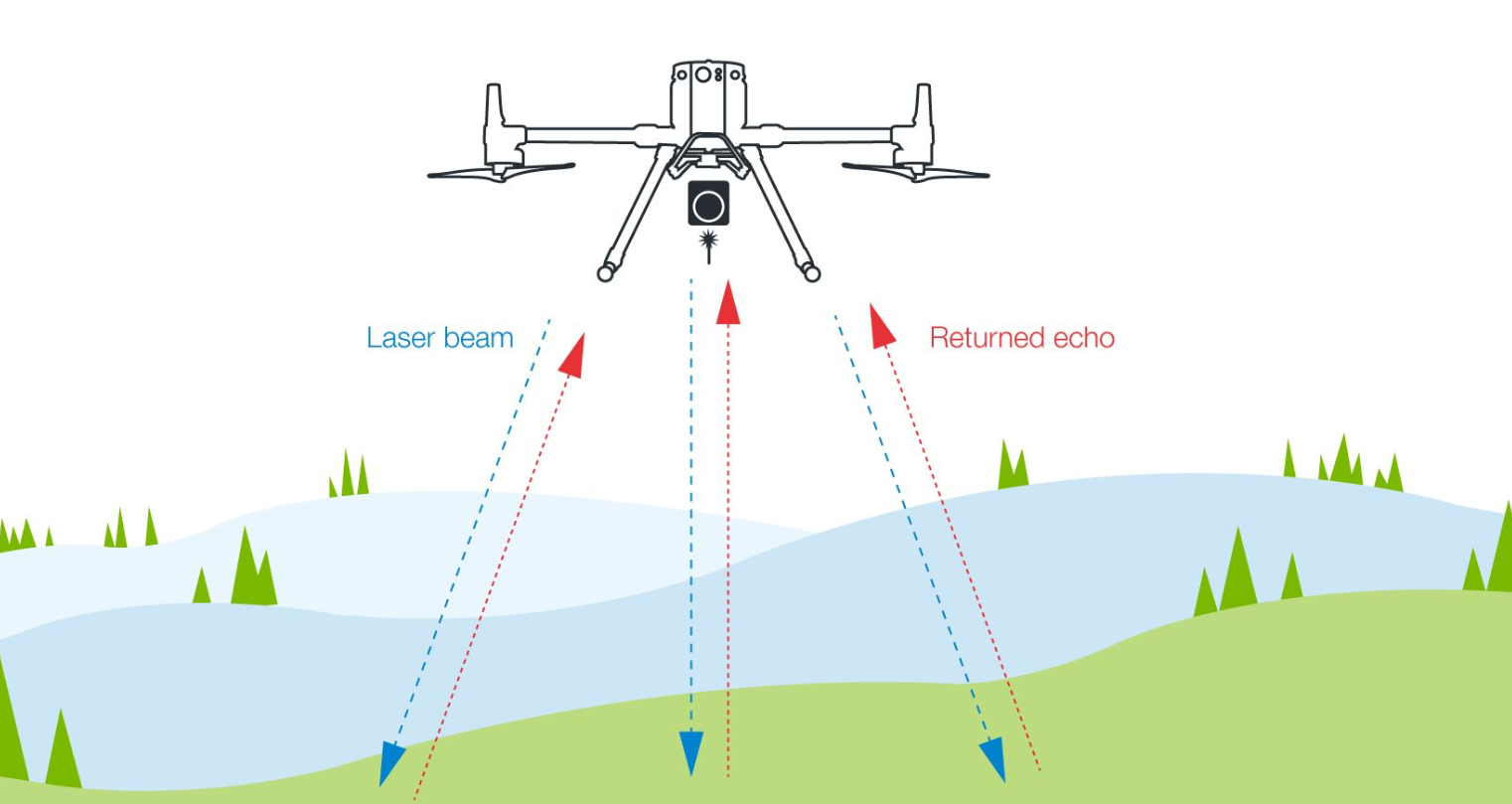
LiDAR drone mapping is the collection of 3D elevation data with a laser scanner carried by a drone. The sensor fires 100,000 to 2 million laser pulses per second, times each return and combines the ranges with GNSS and IMU data into a georeferenced point cloud of the ground, vegetation and structures.
Because the sensor supplies its own light, it records in low light and over snow or fresh asphalt, and enough pulses pass through gaps in the canopy to model bare earth under trees. Processing turns the point cloud into the deliverables surveyors hand over: classified point clouds, digital terrain and surface models (DTM and DSM), contours and cross-sections. On open, well-lit sites, drone mapping with a camera often produces comparable surface models at lower cost.
When to Choose LiDAR Over Photogrammetry
Choose LiDAR when the deliverable depends on ground elevation under vegetation, in poor light or on textureless surfaces. Choose photogrammetry missions for open, well-lit sites where true-color orthophotos and textured 3D models matter.
Cost is the other deciding factor. Photogrammetry runs on the camera you already fly, while a LiDAR payload adds about $14,500 for a DJI Zenmuse L2 and up to $67,500 for a YellowScan Surveyor Ultra. DJI's Zenmuse L2 carries an RGB camera next to the laser, so one flight returns the point cloud and the photos that colorize it. For accuracy, processing and cost differences on stockpiles and earthworks, read the full comparison of drone LiDAR and photogrammetry.
Point Density and Field of View
Point density, measured in points per square meter, is the main planning number in a LiDAR survey. UAV LiDAR sensors emit 100,000 to 2 million pulses per second. At 100 m AGL with a 70° field of view (a swath of about 140 m), a sensor firing 300,000 pulses per second at 8 m/s puts down roughly 270 points/m² in a single pass, before sidelap. Double the pulse rate and density doubles.
Point density matters for different applications. Topographic surveys need 20-50 points/m². Powerline corridor mapping requires 100-200 points/m² to capture wire geometry and vegetation clearance. Detailed infrastructure inspection can demand 300+ points/m² to detect small cracks or surface defects.
The sensor's field of view also affects coverage. Most drone LiDAR systems use a 70° to 105° FOV. Wider angles cover more ground per pass but reduce point density at the edges. Narrow FOV concentrates points in a smaller swath, requiring more flight lines but delivering uniform density.
How to Plan a LiDAR Drone Survey, Step by Step
Plan a LiDAR drone survey backward from the deliverable. Fix the point density and accuracy the client needs, choose the altitude, speed and line spacing that deliver them, load terrain data for terrain following, add IMU calibration and check the plan before you fly.
Step 1: Define Survey Parameters
Start with your deliverable requirements. What does the client need?
Point density: Construction surveys need 50-100 points/m². Forestry applications work with 10-20 points/m². Powerline inspections require 100-200 points/m². Infrastructure detail work demands 300+ points/m².
Accuracy requirements: Topographic surveys typically specify ±5 cm vertical accuracy. Engineering surveys might require ±2-3 cm. Check your sensor's rated accuracy: DJI rates the Zenmuse L2 at 4 cm vertical at 150 m, and survey-grade systems reach 1-2 cm with proper calibration and RTK correction.
Coverage area: Measure the survey zone. A square 50-hectare (124-acre) site (about 710 × 710 m) flown at 80 m AGL with a 70° field of view (about 110 m swath) and 40% sidelap (about 66 m line spacing) needs about 11 flight lines. Calculate battery requirements; each battery provides 30 to 35 minutes of productive flight time.
Terrain complexity: Flat sites are straightforward. Rolling terrain needs terrain-following automation. Steep slopes or cliffs require careful altitude management to maintain safe clearance while keeping point density consistent.
Step 2: Select Flight Parameters
Your sensor specifications drive flight planning calculations.
- Altitude above ground: Most LiDAR surveys fly 50 to 100 m (165 to 330 ft) AGL. Higher altitude covers more area per flight but reduces point density. Lower altitude increases density but requires more flight lines and battery changes.
- Swath width: Calculate swath width as 2 × altitude × tan(FOV ÷ 2). A 70° FOV at 80 m AGL covers about 110 m; a 105° FOV covers about 210 m.
- Flight speed: Faster flight reduces survey time but lowers point density. Typical speeds: 5-8 m/s for detailed surveys, 8-12 m/s for reconnaissance work.
- Point density calculation: Average density ≈ pulse rate ÷ (flight speed × line spacing), counting overlap between strips. A sensor firing 300,000 pulses per second at 8 m/s with 60 m line spacing averages about 625 points/m² (300,000 ÷ 480).
NOTE: This is a simplified estimation. Actual density varies based on scanner mirror speed and overlap settings. Always verify in UgCS during planning. - Line spacing and overlap: Standard practice uses 30-50% sidelap. This ensures coverage gaps don't occur and provides overlap for accuracy verification. A 100 m swath width with 40% overlap means 60 m line spacing.
- Flight direction: Fly perpendicular to terrain slope when possible. This maintains a more consistent AGL than flying up and down slopes. For corridor surveys, fly parallel to the feature (powerline, pipeline, road).
Step 3: Prepare Terrain Data
Accurate terrain following requires quality elevation data.
Elevation data sources: Default datasets like SRTM (30 m resolution) or ASTER (30 m resolution) work for gentle terrain. For complex topography, use higher resolution data:
- USGS 3DEP (1-10 m resolution, USA)
- Copernicus DEM (10-30 m resolution, global)
- Local lidar datasets from previous surveys
- Photogrammetry-derived DEMs from preliminary flights
Import terrain data into your flight planning software. Preview the elevation profile along your planned flight lines. Look for sudden elevation changes that might create clearance issues or excessive altitude variations.
Terrain following settings: Set your desired AGL height. Software calculates the 3D flight path automatically. For survey work, maintain constant AGL (±5 m variation). This keeps point density consistent across the survey area.
Add altitude buffers for obstacles. If the terrain has towers, trees, or structures, add 20-30 m clearance to your base AGL setting in those zones.
Step 4: Plan IMU Calibration Patterns
LiDAR sensors contain Inertial Measurement Units (IMUs) that track sensor orientation. IMU drift over time introduces errors in point cloud geometry. Calibration flights correct this drift.
When to calibrate:
- Before starting the survey (always)
- After battery changes on long missions
- During long missions, at the interval your sensor requires (for DJI Zenmuse L1, L2 and L3, UgCS adds segments every 100 or 200 seconds of flight)
- After the survey (recommended for professional work)
Calibration patterns depend on the sensor. DJI Zenmuse L1, L2 and L3 calibrate on straight segments: the drone flies a 30 m line several times. Many third-party sensors use a figure-8 pattern at the start and end of the route, and YellowScan sensors require a U-shape. Check your sensor documentation, and see how to fly calibration patterns from UgCS.
Flight planning software should automate this. Insert calibration actions at mission start. The drone flies the pattern, then proceeds to survey lines.
Step 5: Build the Flight Plan
Use desktop flight planning software for anything beyond simple area scans. For the screens and settings, follow the step-by-step LiDAR mission setup in UgCS.
For area surveys:
- Draw the survey boundary polygon on the map
- Enter desired point density or manually set altitude, speed, and line spacing
- Set flight direction (perpendicular to terrain slope or prevailing wind)
- Enable terrain following and load elevation data
- Add IMU calibration patterns at start and end
- Set camera actions if your sensor includes RGB capability
- Review the 3D flight path for altitude conflicts or coverage gaps
For corridor surveys:
- Import the corridor centerline (KML, CSV, or draw manually)
- Set corridor width (typically 50-200 m depending on feature)
- Configure flight parameters (altitude, speed, line spacing)
- Enable terrain following
- Add calibration patterns
- Split the mission at battery change points if needed
Mission validation: Preview the elevation profile. Look for sections where AGL varies significantly. Adjust altitude settings if terrain changes force large variations. Check total flight time against battery capacity. Add 20% buffer for wind, temperature effects, and reserve.
Export the mission to your controller or field tablet.
Step 6: Pre-Flight Checks
Field preparation prevents mission failures.
Equipment checks:
- Verify drone battery charge (all batteries)
- Check LiDAR sensor battery level (if separate from drone power)
- Confirm RTK base station setup or NTRIP connection
- Test controller-to-drone communication
- Verify SD card capacity for data storage
- Check propeller condition and mounting
Environmental assessment:
- Wind speed at altitude. Limit: 10-12 m/s (22-27 mph) for most platforms
- Visibility for visual line of sight requirements
- Airspace authorization if required
- Obstacle identification near flight path
Mission rehearsal: Load the flight plan. Review the path on the controller. Verify takeoff and landing points are clear. Confirm altitude settings make sense for visible terrain.
Step 7: Execute the Mission
Launch and monitor the automated flight.
Takeoff: Most software starts missions from takeoff point. The drone climbs to mission altitude, flies to the first waypoint, executes calibration pattern, then begins survey lines.
Monitoring: Watch AGL height during flight. Verify the sensor is recording (check LED indicators or telemetry). Monitor battery level. Most platforms trigger return-to-home automatically at 25-30% battery.
Battery changes: For multi-battery missions, land when prompted. Swap battery. Relaunch. The software resumes from the last completed segment or waypoint.
Data verification: After landing, check that data files are recorded properly. LiDAR sensors save point cloud data to onboard storage. Verify file sizes are reasonable for flight duration. Don't delete anything until you've processed and validated the data.
Step 8: Post-Flight Calibration (Optional but Recommended)
Fly another calibration pattern after completing survey lines. This helps sensor processing software refine IMU corrections. The difference between pre-flight and post-flight calibration data reveals IMU drift during the mission.
Some processing workflows require both calibrations. Check your sensor manufacturer's recommendations.
LiDAR Drone Survey Accuracy
With RTK or PPK correction and a calibrated IMU, current drone LiDAR sensors are rated at 1 to 5 cm. DJI quotes accuracy for the whole system at a set altitude, while scanner makers such as RIEGL quote the laser's ranging accuracy, so results in the field also depend on the IMU, GNSS and flight plan.
These figures assume RTK or PPK correction, IMU calibration before and after the flight, flying within the sensor's rated range, eight or more satellites in view and a correct boresight calibration between the scanner and the IMU.
What Reduces Accuracy
- Poor satellite visibility in canyons, near tall buildings or under power lines. Position errors can grow to 10 to 30 cm without RTK correction.
- Skipped IMU calibration. Point clouds turn wavy, and errors reach 10 to 20 cm even with good sensors.
- Flying near the sensor's maximum range. A sensor rated for 1 to 2 cm at 100 m might deliver 5 to 8 cm at 200 m.
- High speed. With everything else equal, 15 m/s gives worse results than 5 m/s.
- Rushed processing. Weak noise filtering and ground classification add error to every deliverable.
RTK, PPK or Your Own Base Station
LiDAR accuracy depends on positioning quality. Most enterprise drones include RTK (Real-Time Kinematic) GNSS receivers.
RTK setup options:
NTRIP correction: Connect to internet-based correction networks. Requires cellular coverage. Accuracy: 1-2 cm horizontal, 2-3 cm vertical.
Base station: Set up your own RTK base at a known point. Works in areas without cellular coverage. Accuracy: 1-2 cm horizontal, 2-3 cm vertical. Requires base receiver equipment.
PPK (Post-Processed Kinematic): Process positioning data after flight using base station logs. Same accuracy as RTK but doesn't require radio link during flight. Adds processing steps but works in challenging RF environments.
Check Accuracy Against Ground Control
RTK or PPK sets the absolute accuracy, and ground control points prove it to the client. For engineering, cadastral and other work a third party will check, place 4 to 6 GCPs around the perimeter and 1 to 2 inside on sites under 50 hectares (124-acres), add more on larger sites, and measure them with survey-grade GNSS to ±2 cm. Process the point cloud with RTK positions, measure the GCPs in the cloud and compare. If the comparison shows a systematic offset, most processing packages can adjust the point cloud to the control. Keep a few points out of the adjustment as independent check points and report their RMS error in the deliverable.
How Much Does a LiDAR Drone Survey Cost?
LiDAR drone surveys are priced per acre or hectare, per mile or kilometer of corridor, per field day or per project, and most providers set a minimum charge. The ranges below come from US price guides published in 2026 by survey providers and drone training companies.
Typical Service Rates
Rates vary by region. Stockpile surveys for mining operations and quarries are billed per survey or under a retainer. For comparison, a 2026 power line inspection guide from Drone Launch Academy puts helicopter inspection at $1,200 to $1,600 per mile against $200 to $300 per mile for drones, and recent US government rate schedules list two-person ground survey crews at about $150 to $250 an hour.
What Drives the Price
- Point density and accuracy specification. Higher density means lower, slower flights and more batteries per hectare.
- Ground control. Placing and measuring GCPs and check points adds field time on engineering and cadastral jobs.
- Terrain and vegetation. Steep or forested sites need terrain following, extra sidelap and more classification work.
- Processing and deliverables. Classifying a 50-hectare survey at 100 points/m² takes 4 to 8 hours, and DTMs, contours and clearance reports add to that.
Equipment Cost for In-House LiDAR Surveys
Prices are US list prices before sales tax. Prices in other markets differ with VAT, import duties and dealer margins.
Add spare batteries, processing software and, where no NTRIP network is available, an RTK base station. A DJI Matrice 400 combo with a Zenmuse L3 and UgCS EXPERT comes to about $33,000 before those extras.
DJI's drones and LiDAR payloads are still sold in the US because the FCC authorized them before December 22, 2025. A proposal the FCC published in July 2026 would stop further imports of foreign-made drones with LiDAR; it had not been adopted in October 2026. For the latest, see the current status of the US DJI ban and the non-DJI drones that carry LiDAR payloads.
Flight Settings and Field Tips for UAV LiDAR Mapping
Altitude, speed, weather and batteries decide how much of the planned point density you get in the field.
Technical Optimization
Optimal Flying Height
Balance coverage against point density. Most survey work flies 50 to 100 m (165 to 330 ft) AGL, with lower flights for detail work and higher ones for reconnaissance.
- 40 to 60 m (130 to 200 ft): detailed infrastructure inspection, dam surveys and archaeology, where small features matter.
- 60 to 100 m (200 to 330 ft): topographic surveys, forestry and powerline corridor mapping. Most survey work sits in this band.
- 100 to 120 m (330 to 400 ft): reconnaissance and preliminary site assessment, where coverage per battery matters more than detail. 120 m (400 ft) is the maximum altitude under FAA Part 107 and in the EU Open category.
At a fixed pulse rate and speed, the swath widens in proportion to altitude, so point density falls in proportion to altitude. Double the height and density roughly halves: a sensor that delivers 200 points/m² at 50 m delivers about 100 points/m² at 100 m. Calculate density for your sensor with the formula in Step 2, or let the flight planner do it.
Speed Considerations
Flight speed directly affects point density along the flight direction.
Slow (3-5 m/s): Increases point density and improves feature detection. Use slower speeds for corridor surveys where you need to capture small objects (powerline hardware, pipeline markers). Also beneficial in steep terrain where terrain-following system needs response time.
Medium (5-8 m/s or 18 mph): Standard for most survey work. Good balance between coverage efficiency and data quality. Most professional operators fly in this range.
Fast (8-12 m/s): Reduces point density but covers large areas quickly. Acceptable for reconnaissance work or projects where point density requirements are modest (20-50 points/m²).
Calculate actual point density before flying. A sensor firing 300,000 pulses per second flying 5 m/s with 60 m line spacing produces a different density than the same sensor at 10 m/s. Software should calculate this automatically based on your flight parameters.
Battery Management
Cold temperatures significantly reduce flight time. LiPo batteries lose 20-30% capacity below 10°C (50°F) and 40-50% capacity below 0°C (32°F).
Cold weather protocol:
- Store batteries at room temperature until field deployment
- Use battery warming bags or keep batteries inside your vehicle heater
- Warm batteries to 20-25°C (68-77°F) before installation
- Launch immediately after installing warm batteries
- Expect 25-30% shorter flight times in freezing conditions despite warming
Plan battery counts accordingly. A site requiring 4 batteries in summer might need 6 batteries in winter. Keep spares warm in a heated vehicle between flights.
Common LiDAR Drone Survey Mistakes
Insufficient Calibration
Skipping proper IMU calibration leads to wavy or distorted point clouds. The sensor's internal gyroscopes and accelerometers drift during flight. Calibration patterns expose the IMU to varied orientations so processing software can calculate correction factors.
Symptoms of poor calibration:
- Point clouds appear wavy or rippled
- Buildings lean or appear twisted
- Ground surfaces show systematic undulation
- Vertical features (walls, trees) appear tilted
Fix: Always calibrate before survey flights. For missions longer than 30 minutes, add mid-flight calibration patterns. Fly post-flight calibration for professional deliverables. Some sensor manufacturers' processing software requires both pre and post calibrations for optimal results.
Inadequate Overlap
Using less than 30% overlap between flight lines creates gaps in UAV LiDAR data. Wind drift, GPS errors, or terrain variations push the actual flight path away from planned routes. Insufficient overlap means these deviations create data gaps.
Fix: Use 40% overlap as standard practice. Increase to 50-60% in windy conditions or challenging terrain. The time investment is small compared to re-flight costs.
Rushing Post-Processing
Taking time to properly classify points and filter noise dramatically improves deliverable quality. Raw LiDAR point clouds contain noise from birds, insects, atmospheric returns, and multipath errors.
Processing workflow:
- Import and verify: Load raw point cloud. Check coverage, point density, and verify no data gaps exist.
- Noise filtering: Remove outliers (points far above or below local surface). Most LiDAR processing software provides automatic noise filters. Inspect results and manually remove remaining obvious errors.
- Ground classification: Separate ground returns from vegetation, buildings, and other features. This is critical for bare-earth DEM generation. Automated classification works on gentle terrain. Complex sites need manual verification and editing.
- Feature extraction: Classify buildings, vegetation, powerlines, or other features relevant to project deliverables. Quality classification makes data useful for clients.
- Accuracy verification: If you established GCPs, measure them in the point cloud. Calculate RMS error. Professional deliverables should include accuracy statements.
- Deliverable generation: Export classified point clouds, DEMs, contour maps, or other products per client specifications.
Allocate processing time appropriately. A 50-hectare survey with 100 points/m² takes 4-8 hours to process properly, including classification review and editing. Rushing through classification in 1-2 hours produces inferior deliverables.
Poor File Management
LiDAR projects generate large datasets. A single flight creates 2-10 GB of raw sensor data. Multi-flight projects with RGB imagery included can exceed 50-100 GB.
File management protocol:
- Copy raw data from sensor to computer immediately after landing
- Verify file integrity before deleting sensor storage
- Maintain organized folder structure (Client/Project/Date/Flight)
- Keep raw data archived even after processing
- Back up to separate physical drives or cloud storage
Lost data means complete re-flight. Invest in proper storage and backup systems.
Ignoring Manufacturer Processing Requirements
Different LiDAR sensors have specific processing workflows. Some require proprietary software for initial processing before exporting to standard formats. Others work directly with third-party tools.
Read your sensor manual's processing section. Using incorrect processing workflows degrades accuracy or introduces artifacts. Manufacturer software often includes calibration refinement tools that improve results significantly.
Flying Too High for Project Requirements
Altitude seems like free efficiency, but point density constraints determine usable maximum altitude.
Example: A client asks for 100 points/m². A DJI Zenmuse L2 records up to 240,000 points per second in single-return mode, and its 70° field of view covers a swath of about 168 m at 120 m AGL. Flown at 15 m/s in single passes, that gives 240,000 ÷ (15 × 168) ≈ 95 points/m², which fails the specification. At 100 m AGL (swath about 140 m), the same flight gives about 114 points/m².
Fix: Calculate required altitude before planning missions. Work backward from point density requirements. Verify your planned parameters deliver the specified density. Software should calculate this automatically, but verify the math yourself.
Not Testing Processing Workflow
Process a small test section before committing to large projects. Verify your processing software handles your sensor's data format. Confirm classification tools work on your terrain type. Test deliverable export formats match client requirements.
A test flight over 5-10 hectares (about 890 acres) reveals workflow issues before you fly 500 hectares and discover problems during processing.
LiDAR Sensors and Drone Platforms for Surveying
To execute successful LiDAR drone mapping projects, professionals need two core components: a specialized LiDAR sensor and a capable drone platform. Choosing the right combination requires understanding the underlying technology.
Compact vs. Rotating-Mirror Sensors
The scanning mechanism sets a sensor's field of view, point pattern, weight and price. Compact sensors such as the DJI Zenmuse L2 cost and weigh less and suit topographic mapping, construction and general survey work. Rotating-mirror scanners from RIEGL and spinning multi-beam sensors from makers such as Hesai and Ouster, used in YellowScan, ROCK and Freefly payloads, cost more and offer a wider field of view and higher precision for corridor, urban and engineering work.
1. Compact Sensors (e.g., DJI Zenmuse L2)
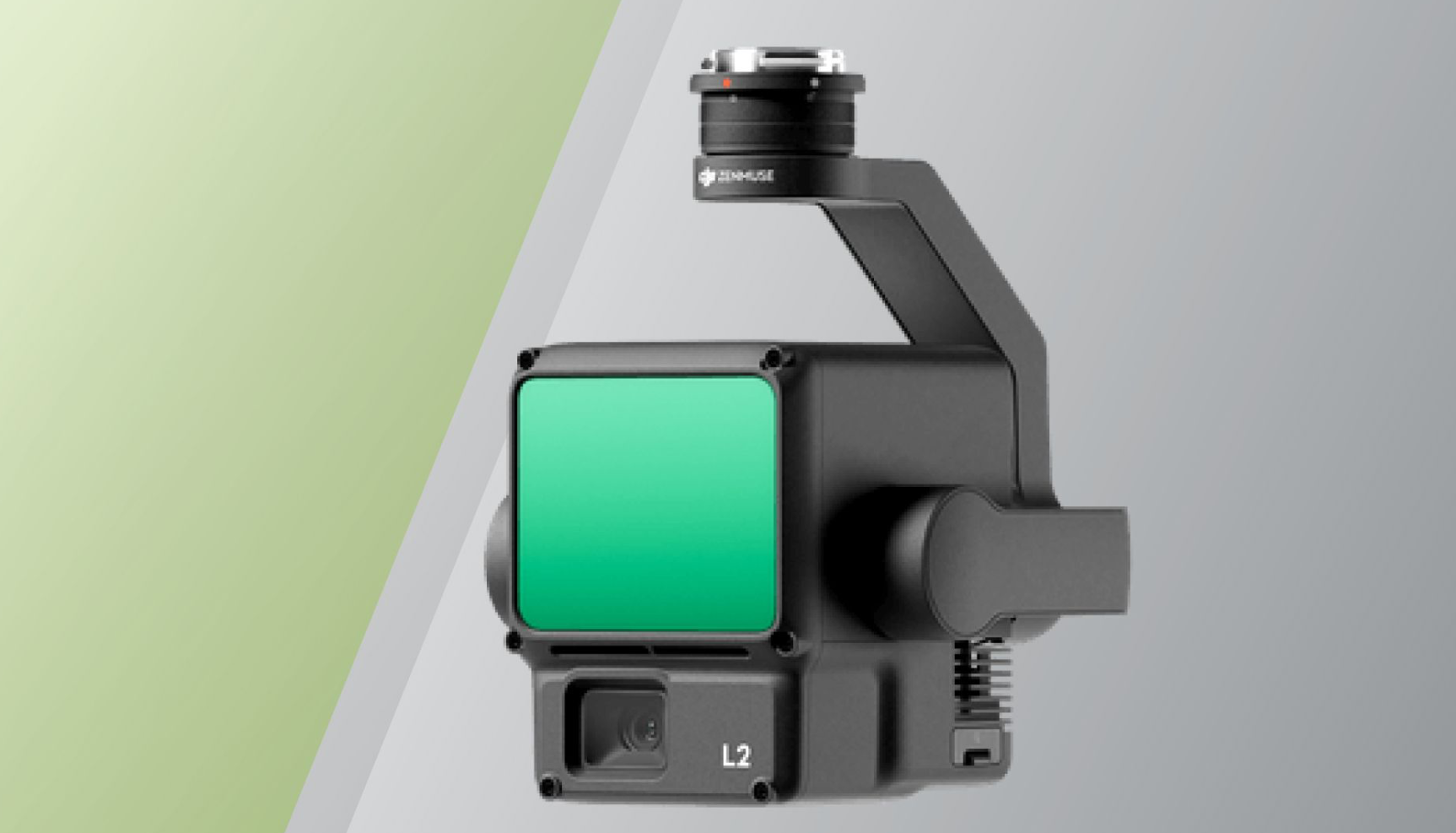
Compact sensors like the Zenmuse L2 (905 g, with an integrated RGB camera) are built to ride on DJI Matrice platforms. They suit everyday surveying and construction work where weight, durability and price matter more than maximum range and precision. DJI's Zenmuse L3 (1.6 kg, launched in November 2025) extends the range to 950 m at 10% reflectivity and flies only on the Matrice 400.
2. Rotating-Mirror and Spinning Sensors (e.g., RIEGL VUX-1UAV22, Ouster OS1)
| Riegl VUX-1UAV | Ouster OS1 | YellowScan's Surveyor Ultra |
|---|---|---|
 |
 |
 |
These systems use rotating mirrors or oscillating lasers to sweep a wide field of view, up to 360° on some models. While they have moving parts, they typically offer superior field of view (FOV) and higher point density. These sensors are often preferred for high-end corridor mapping or urban planning where a wider swath and extreme detail are required.
LiDAR Sensor Selection for Mapping
The sensor is equally important as the drone platform. Options range from entry-level to survey-grade:
- Entry-level: Velodyne VLP-16 Puck, YellowScan Mapper+ (rated 3-4 cm). Suitable for forestry applications, rough topographic surveys, and projects where absolute accuracy matters less than relative measurements.
- Mid-range: DJI Zenmuse L2 and L3, ROCK R3 Pro V2 (rated 2-4 cm). These sensors handle most commercial surveying, powerline inspection, and construction monitoring. The Zenmuse L2 integrates an RGB camera for simultaneous photo capture.
- Professional, survey-grade: RIEGL miniVUX-3UAV and VUX-1UAV22, YellowScan Surveyor Ultra (rated 1-2.5 cm). Survey-grade sensors for cadastral work, engineering surveys, and applications requiring highest accuracy. Higher measurement rates (up to 1.2 million per second on the VUX-1UAV22) deliver denser point clouds.
Enterprise Drone Platforms for LiDAR Mapping
Your platform must handle the payload weight while providing RTK positioning accuracy.
DJI Enterprise Series
Key specs of the DJI Matrice series for LiDAR work:
- Payload capacity: 2.7 kg (6 lb) on the M350 RTK and M300 RTK, enough for the Zenmuse L2 or YellowScan Surveyor; 6 kg (13 lb) on the Matrice 400.
- Flight time: 55 minutes maximum without payload on the M350 and M300, 59 minutes on the Matrice 400 (DJI figures). Expect 30-43 minutes of productive survey time with a LiDAR payload, depending on conditions.
- Positioning accuracy: Built-in RTK modules provide centimeter-level precision (1-2 cm horizontal) to eliminate GPS drift.
- Environmental resilience: IP55 (M350 and Matrice 400) and IP45 (M300) ratings allow reliable operation in rain and dust.
- Sensor integration: Native "plug-and-play" compatibility with DJI payloads reduces field setup time.
Top platforms:
1. DJI Matrice 400
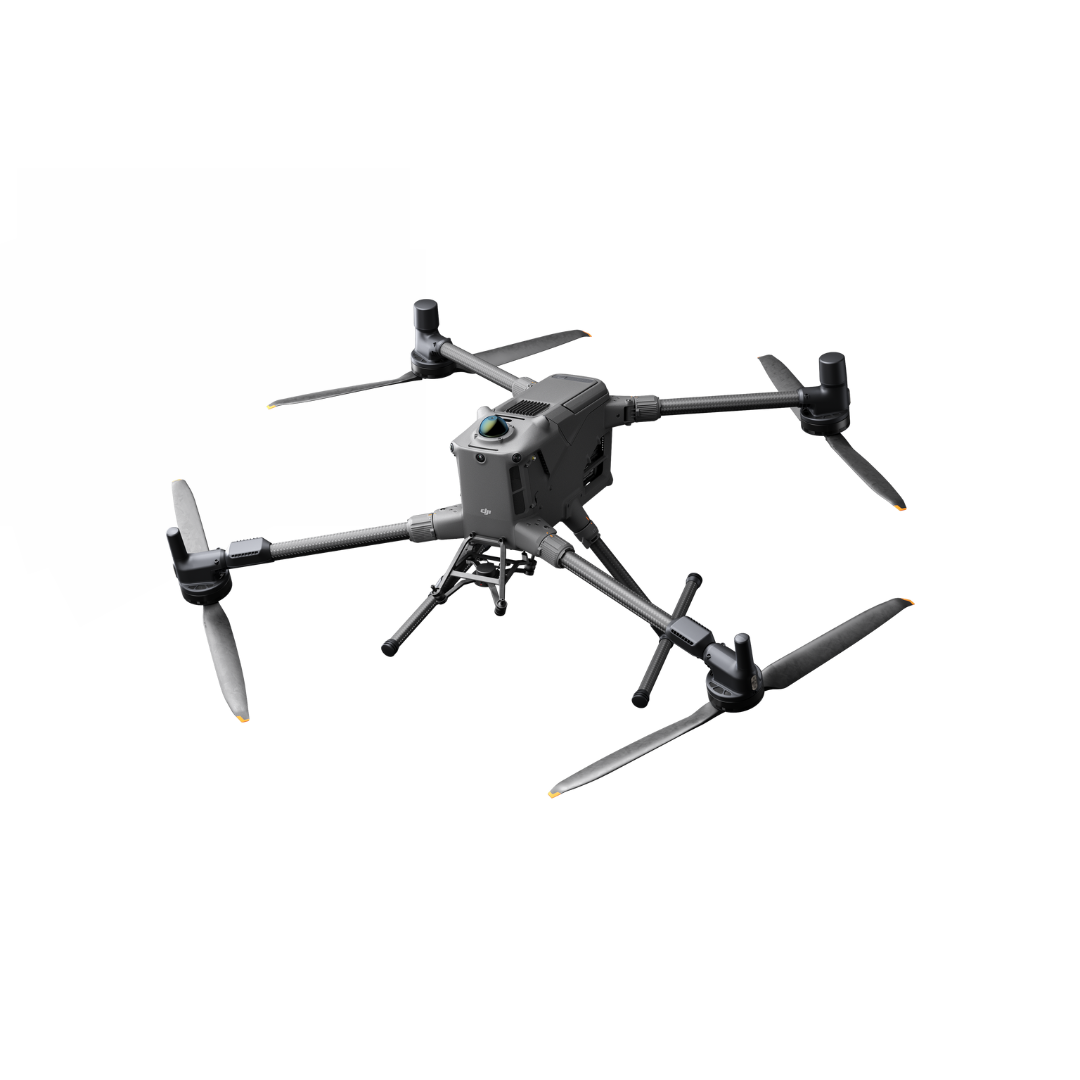
DJI's current flagship, launched in June 2025. It carries up to 6 kg, flies up to 59 minutes and can mount up to seven payloads at once, which makes it the carrier for the Zenmuse L3 and heavier survey-grade scanners. A rotating LiDAR, an upward 3D ToF LiDAR and mmWave radar detect fine obstacles such as powerlines.
2. DJI Matrice 350 RTK
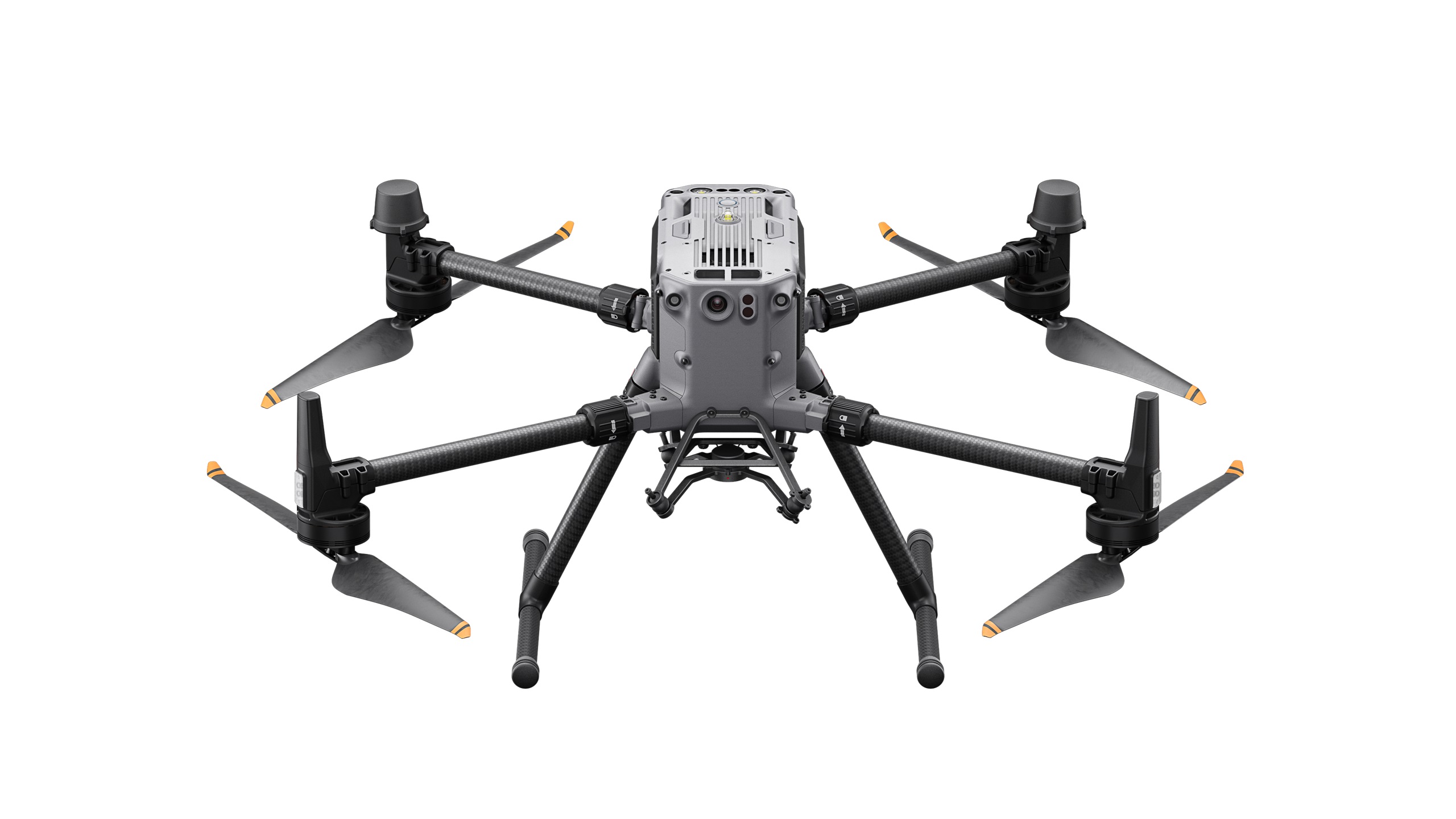
The flagship before the Matrice 400 and the most common carrier for the Zenmuse L2. It features an IP55 weather rating and an upgraded night-vision FPV camera for low-light safety. Its TB65 hot-swappable batteries are rated for 400 cycles, and it carries up to 2.7 kg. US dealers now list it as replaced by the Matrice 400.
3. DJI Matrice 300 RTK
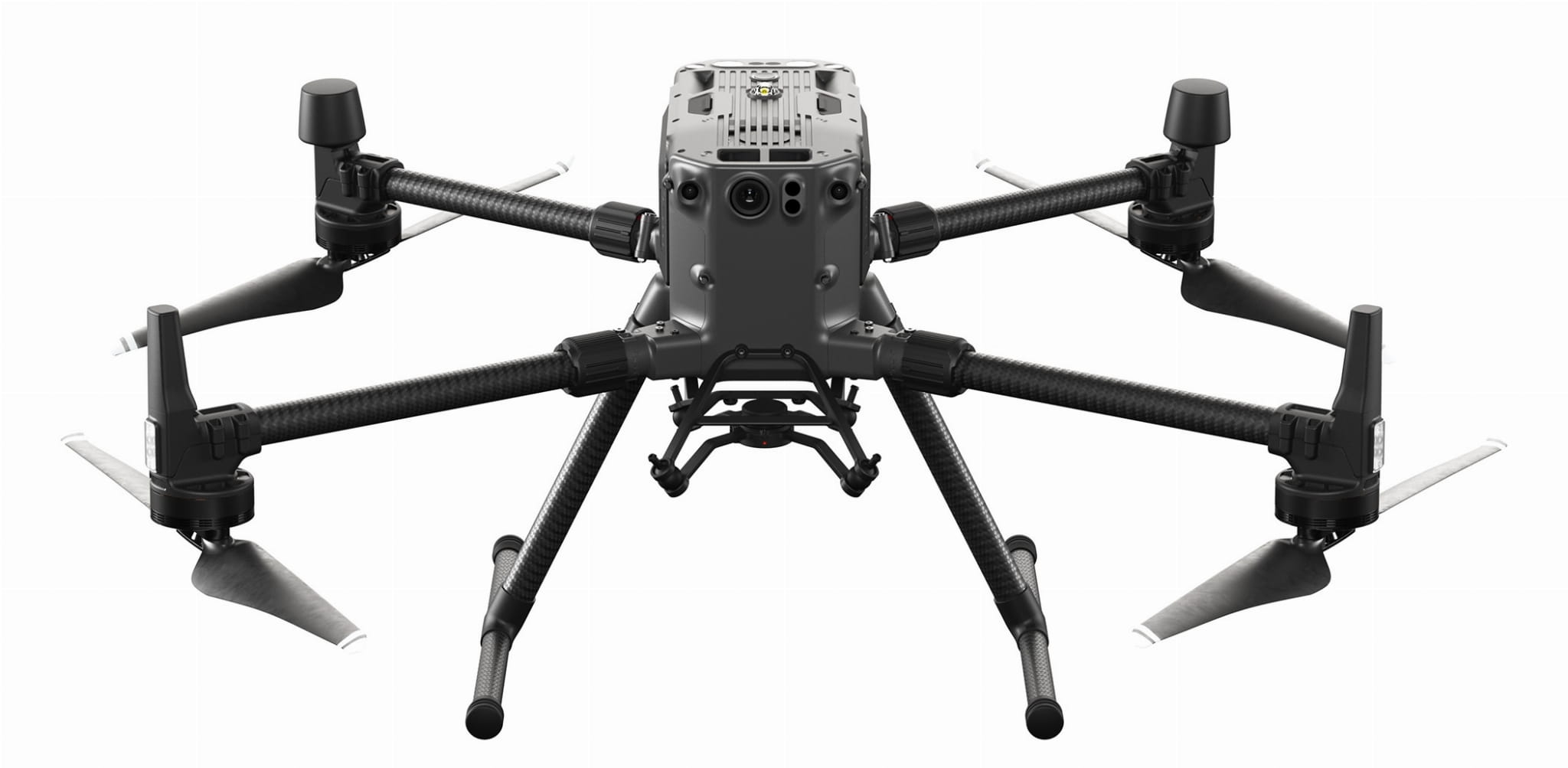
Discontinued in 2023 but still widely flown. It matches the M350's 55-minute max flight time and 2.7 kg payload capacity, carries an IP45 rating, and works with most third-party LiDAR sensors (ROCK Robotic, YellowScan).
Alternative Enterprise Drone LiDAR Platforms
Other manufacturers build LiDAR-capable multirotors and fixed-wing VTOL drones. For large areas, fixed-wing VTOL drones such as the WingtraOne GEN II and Quantum Systems Trinity Pro trade hover capability for range and speed.
1. Freefly Astro
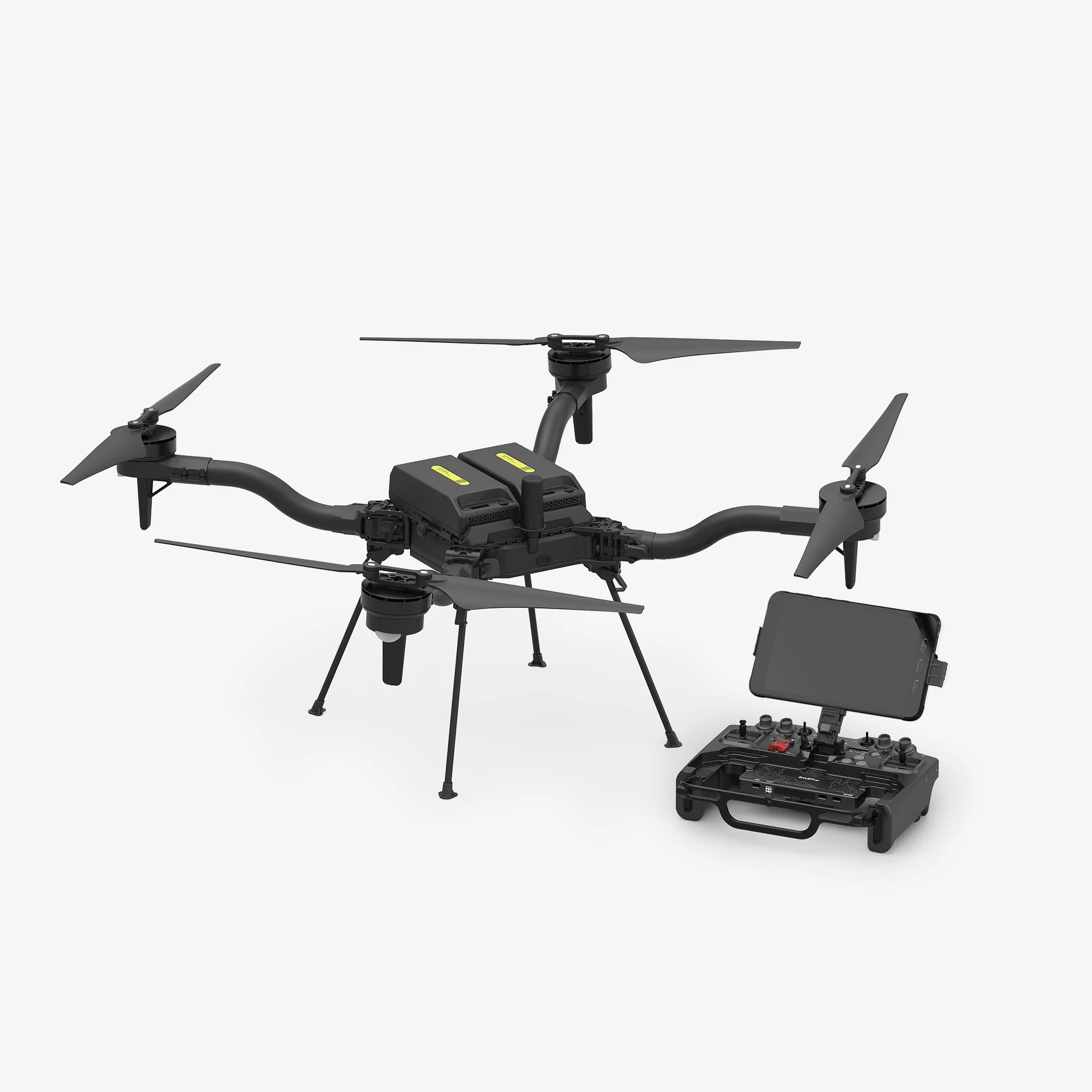
A US-built quadcopter. The Astro carries up to 1.5 kg (3.3 lb) for about 25 minutes, and the Astro Max carries 3 kg (6.6 lb) for about 18 minutes, with about 37 minutes of flight without a payload (Freefly figures). Freefly's Flux O1 LiDAR payload uses an Ouster sensor.
2. Acecore Neo
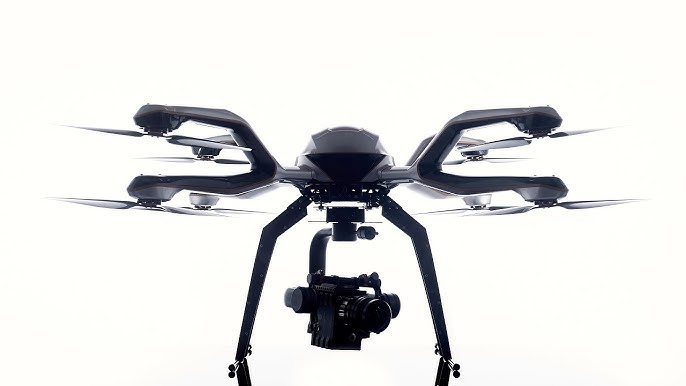
An octocopter with up to 9 kg (20 lb) of payload and up to 23 minutes of flight (published figures), built for heavy survey-grade scanners. Modular design allows quick payload swaps.
3. Wingtra One
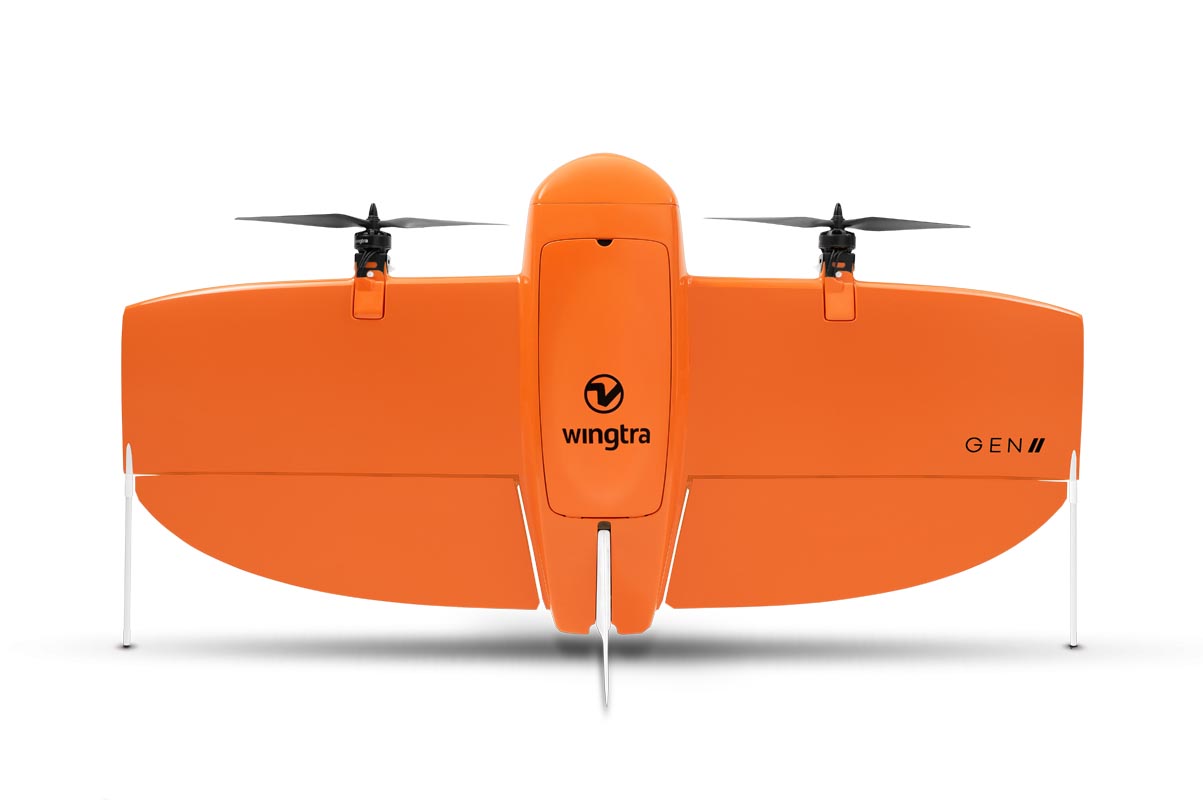
Fixed-wing VTOL design for large-area LiDAR mapping. With the Wingtra LIDAR payload (1,030 g), it covers up to 360 hectares per flight at 90 m with 3 cm vertical RMS accuracy (Wingtra figures). Trades maneuverability for speed and range. Best for corridor mapping and regional surveys where terrain allows higher altitude operations.
4. Quantum Systems Trinity Pro
Fixed-wing VTOL that carries the Qube 640 LiDAR. In a sample flight published by Quantum Systems, it covered 170 hectares at 75 m (125 to 175 acres) in 42 minutes. The Trinity Pro can fly up to 90 minutes, capped at 59 minutes by default. Like other fixed-wing drones, it needs open space for transitions and can't work tight corridors.
LiDAR Sensor Specs Compared
This table provides a comparison of various LiDAR models based on key performance parameters, including Weight, Laser Range, Accuracy, Precision, and Shots per Second:
LiDAR Flight Planning Software
DJI Pilot 2 handles standard mapping missions, but survey-grade LiDAR needs a desktop mission planner that works from the sensor's field of view, the required point density and terrain data.
UgCS is drone flight planning software with dedicated LiDAR flight planning tools in its EXPERT and ENTERPRISE editions. It covers four parts of LiDAR data collection:
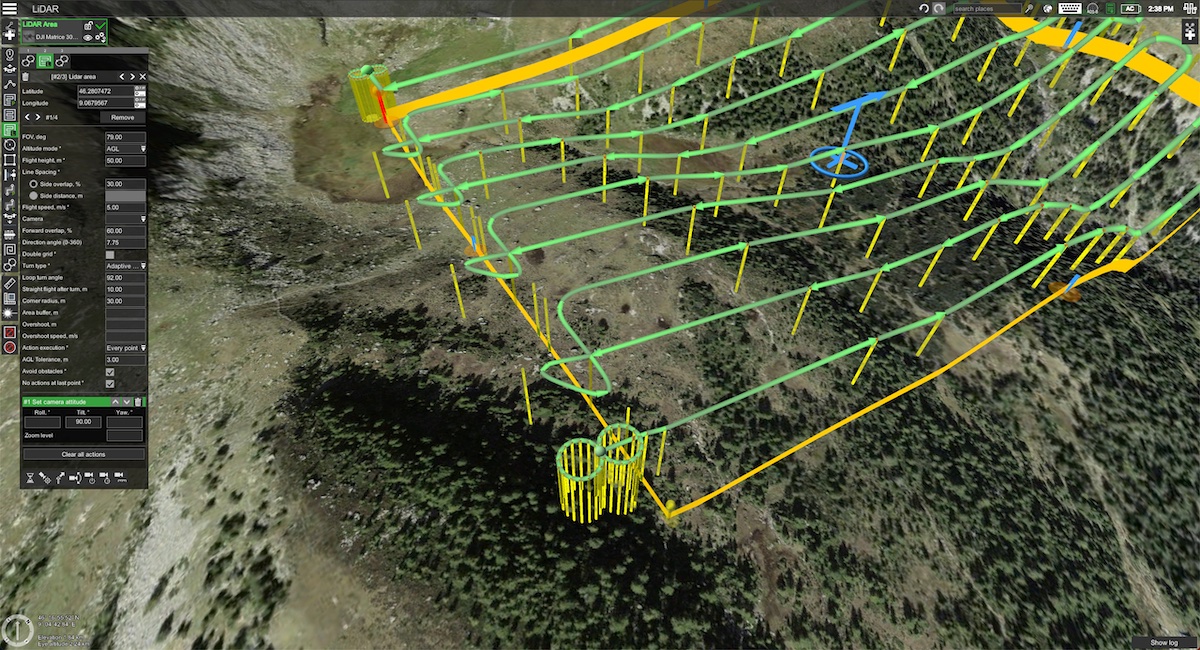
1. True Terrain Following (Constant AGL)
The Challenge: If a drone flies at a fixed altitude (AMSL) over a hill, the distance to the ground decreases. This narrows the sensor's swath width and dangerously increases point density, creating inconsistent data.
The UgCS Solution: UgCS allows you to import high-resolution DEMs (Digital Elevation Models). It automatically calculates a flight path that maintains a precise Above Ground Level (AGL) altitude, ensuring uniform point density and safe clearance over steep terrain.
2. Automated IMU Calibration
The Challenge: LiDAR IMUs drift during flight, which shows up as wavy or distorted point clouds. Calibration maneuvers flown by hand are hard to repeat exactly.
The UgCS Solution: For DJI Zenmuse L1, L2 and L3, UgCS adds IMU calibration segments to the route automatically at the start and end of the mission and again during long missions (every 100 seconds of flight for the L1, every 200 seconds for the L2 and L3). For other sensors, you place figure-8 or U-shape calibration patterns at the start and end of the route from the planning toolbar.
3. LiDAR-Specific Area & Corridor Tools
The Challenge: Calculating flight lines based on overlap is standard for cameras, but LiDAR requires calculations based on Field of View (FOV) and Point Density.
The UgCS Solution: The built-in LiDAR toolset calculates your optimal flight speed, altitude, and line spacing based on your specific sensor's FOV and your client's required point density (points/m²). This replaces spreadsheet calculations.
4. Offline & Remote Capability
The Challenge: High-value LiDAR jobs (forestry, mining, pipelines) often occur in remote zones with no cellular coverage.
The UgCS Solution: UgCS offers full offline functionality. You can cache maps and elevation data on your laptop or controller before heading to the field, ensuring you can plan and adapt missions anywhere.
UgCS editions for LiDAR work:
- UgCS Open: free and built on the same planning engine, limited to two route uploads or exports per day, 250 m between the two furthest points of a route and two projects at a time. Use it to learn the workflow; LiDAR missions need UgCS EXPERT.
- UgCS EXPERT: adds the LiDAR Area and LiDAR Corridor tools, automated IMU calibration, Smart AGL for steep slopes and large projects.
- UgCS ENTERPRISE: everything in EXPERT plus multi-drone operation with up to 10 drones, central mission sharing, server deployment and SDK access.
LiDAR Drone Survey Applications by Industry
Here is how four sectors use LiDAR drone data.
1. Construction and Land Surveying
Civil engineers need digital elevation models (DEMs) before breaking ground. Surveyors deliver contour maps, cross-sections, and cut/fill volumes for earthwork planning. Ground crews with total stations need days to survey 10 hectares. A drone with LiDAR covers that in two flights.
Applications of LiDAR drones in construction and land surveying:
- Site preparation surveys. Developers need existing conditions before design work starts. LiDAR captures terrain with sub-5 cm vertical accuracy. Import the point cloud into Civil 3D or 12d Model. Engineers design grading plans directly from your data.
- Progress monitoring. Construction managers track earthwork volumes weekly. Compare baseline and current point clouds. Software calculates cut and fill volumes automatically. Contractors verify subcontractor work and prevent billing disputes.
- Stockpile volumetrics. Mining and aggregates operations need inventory counts. LiDAR captures pile geometry regardless of material color or texture (coal, gravel, ore). Surveyors bill per stockpile or monthly subscription.
- As-built documentation. Final surveys verify construction matches design. LiDAR captures roads, drainage, and grading. Deliverables include contour maps at 0.25 m or 0.5 m intervals, spot elevations, and deviation analysis from design surface.
The key advantage over photogrammetry? Bare-earth accuracy on disturbed sites. Construction zones have mud, standing water, and minimal vegetation. Photogrammetry struggles without visual texture. LiDAR measures elevation directly.
2. Forestry and Environmental Monitoring
Forest managers pay for data ground crews can't collect efficiently. Timber companies need stand metrics across thousands of hectares. Environmental consultants map wetlands and monitor restoration projects.
Applications of LiDAR drones in forestry and environmental monitoring:
- Timber inventory and cruise. Traditional forest inventory samples 2-5% of a stand using plot measurements. Foresters extrapolate to the full area, introducing error. LiDAR scans 100% of the canopy. Software derives tree height, canopy closure, and basal area from the point cloud. Timber cruisers use this for volume estimates and harvest planning. A single sensor records multiple returns per pulse. First return captures treetops. Intermediate returns map branch structure. The last return hits the ground. Classify returns by height to separate ground, understory, mid-story, and canopy layers.
- Carbon stock assessment. Conservation projects and carbon credit programs need biomass estimates. LiDAR-derived canopy metrics correlate with above-ground biomass. Analysts apply allometric equations specific to species and region. Accuracy improves when LiDAR data combines with field-sampled calibration plots.
- Wetland delineation. Wetland boundaries depend on micro-topography (elevation changes of 10-30 cm). Traditional surveys require walking transects with GPS and staff. LiDAR captures bare-earth elevation under vegetation. Hydrologists import the DEM into GIS, model water flow, and delineate jurisdictional boundaries.
- Coastal erosion monitoring. Repeat surveys detect shoreline changes. Compare point clouds from different years. Software calculates volumetric loss or accretion. Coastal managers use this for restoration planning and infrastructure risk assessment.
The penetration capability matters here. Forest canopies block 80-95% of sunlight. Photogrammetry can't see the ground. LiDAR pulses slip through gaps. You get bare-earth DEMs even under dense canopy. Typical point density: 10-20 ground returns per square meter under mature forest.
3. Infrastructure Inspections
Utilities and transportation agencies inspect thousands of kilometers of linear infrastructure annually. Powerline corridors cross mountains and forests. Pipelines run through remote terrain. Railways need clearance verification and embankment monitoring.
Applications of LiDAR drones in infrastructure inspections:
- Powerline corridor surveys. Electric utilities need vegetation clearance analysis. Regulations mandate minimum distances between conductors and trees. LiDAR captures both wire geometry and vegetation structure in one flight. Fly the corridor at 60-80 m altitude, 5-8 m/s ground speed. Process the point cloud to classify wires, towers, and vegetation. Software measures clearance distances automatically. Output identifies trees requiring trimming with GPS coordinates for ground crews. Utilities bill this per kilometer of corridor or per tower span.
- Pipeline right-of-way monitoring. Oil and gas operators monitor pipelines for third-party intrusion, erosion, and ground movement. LiDAR detects unauthorized construction, vegetation encroachment, or terrain changes that threaten buried infrastructure. Repeat surveys (annual or semi-annual) reveal ground subsidence, washouts, or slope instability. Compare point clouds to measure vertical displacement. Operators prioritize inspection of high-risk segments.
- Railway corridor clearance. Rail operators need structure gauge verification. Signals, platforms, and bridges must maintain clearance envelopes around tracks. LiDAR surveys capture track geometry and adjacent structures. Engineers verify clearances meet standards and identify encroachments.
- Bridge inspection. Traditional inspections use bucket trucks, scaffolding, or rope access. LiDAR captures bridge underside geometry, pier structure, and approaches without physical access. Point clouds document existing conditions. Repeat surveys track deflection, settlement, or structural deformation.
The value proposition here is simple: drones fly faster and safer than ground crews or helicopters.
4. Archaeology and Heritage Preservation
Archaeologists use LiDAR to detect features invisible at ground level. Ancient settlements, roads, and field systems leave subtle topographic signatures. Elevation differences of 20-50 cm reveal structures buried under soil or vegetation.
Applications of LiDAR drones in archaeology and heritage preservation:
1. Archaeological site discovery:
LiDAR has rediscovered Maya cities under Central American jungle, medieval villages in European forests, and prehistoric earthworks in North America. The technology strips vegetation digitally, revealing micro-topography that indicates human activity. Research teams fly LiDAR over known archaeological zones. Analysts process the point cloud to generate a bare-earth DEM. Hill-shading and slope analysis highlight linear features (roads, walls) and mounds (building foundations, burial sites).
Two examples: drone LiDAR flights planned in UgCS that found 36 archaeological sites in Spain and a drone LiDAR survey that mapped three hidden defensive walls at Kastrì-Pandosia, Greece.
2. Cultural heritage documentation:
Historic buildings, monuments, and landscapes require detailed records for preservation and restoration. LiDAR produces detailed 3D models. If structures collapse or suffer damage, architects have precise geometric data for reconstruction.
Combined RGB and LiDAR surveys deliver both geometry and texture. The point cloud provides measurements. Photos supply visual detail. Together, they create complete digital archives.
3. Landscape analysis:
LiDAR reveals historical land use patterns. Old field boundaries, drainage systems, and terraces show up in the bare-earth DEM. Historians use this data to understand past agricultural practices and settlement patterns.
The penetration capability matters in archaeological surveys just as in forestry. Ancient sites are often covered by vegetation. LiDAR penetrates forest canopy to reveal ground features that would otherwise require ground-clearing for traditional survey methods.
Next Steps
Start from the deliverable the client will check: point density and accuracy. Those two numbers set the altitude, speed, line spacing and calibration plan, and they decide whether a mid-range sensor such as the Zenmuse L2 is enough or the job needs a survey-grade scanner.
UgCS Open is free and runs the same planning engine as the paid editions, with two route uploads or exports per day and a 250 m route limit, so you can learn the workflow on small sites. The LiDAR Area and LiDAR Corridor tools, Smart AGL and automated IMU calibration come with UgCS EXPERT.
Frequently Asked Questions About LiDAR Drone Mapping
What are the best weather conditions for LiDAR drone surveys?
Overcast, dry days with wind under 8 m/s (18 mph) and temperatures between 10 and 30°C (50 and 86°F). Cloud cover does not affect laser returns, and sun angle and shadows do not matter because the sensor supplies its own light. Winds of 8 to 12 m/s (18 to 27 mph) are workable if you watch altitude hold and raise sidelap from 40% to 50 or 60%.
Avoid rain, falling snow, fog and winds over 15 m/s (34 mph). Water droplets and snowflakes scatter laser pulses and shorten range, and strong wind degrades IMU performance and pushes the drone off its planned lines. Snow already on the ground is fine because you are measuring the snow surface. In temperate climates, late fall and early spring work well: deciduous trees are bare, so more pulses reach the ground.
How much area can be covered in a single LiDAR drone flight?
A DJI M300 or M350 RTK carrying a Zenmuse L2 typically covers 50 to 70 hectares per battery at 80 m AGL, 8 m/s and 40% sidelap, or 25 to 35 hectares (60 to 85 acres) at 60 m, 6 m/s and 50% sidelap. Fixed-wing VTOL drones cover more: Wingtra rates the WingtraOne GEN II with its LiDAR payload at up to 360 hectares per flight at 90 m. Corridors are limited by flight distance. At 8 to 10 m/s, 35 minutes of survey time is 17 to 21 km (10 to 13 miles) of flight line, so a 100 m wide corridor flown in two or three lines covers about 6 to 10 km (4 to 6 miles) per battery.
Plan 20 to 30% less coverage in wind over 10 m/s, in cold weather, over steep terrain or when the route includes several calibration segments. A 200-hectare site at 80 m takes three to four batteries and four to six hours on site, including setup and post-flight checks.